The courtroom does not pause because an exhibit tab is missing, a ruling was not updated, or the only current witness outline is sitting in someone else’s inbox. A trial notebook is the working control center for the case team: a disciplined, current record of what must be found and used quickly when the pressure is highest.
For high-stakes matters, the notebook is not simply a binder assembled at the end of discovery. It is a coordinated trial-preparation system that connects pleadings, evidence, witness materials, court orders, demonstratives, and production logistics. Whether it is maintained as a physical set, a secure digital workspace, or both, its value comes from accuracy, version control, and immediate usability.
What a Trial Notebook Must Accomplish
A useful trial notebook answers practical questions without requiring a search through email chains or shared-drive folders. What has the court ruled? Which exhibit version is admitted, marked, or reserved? Who is appearing tomorrow? What foundation is required for a particular record? Where is the clean copy that can be handed to the clerk, witness, or opposing counsel?
The notebook should give trial counsel and litigation support personnel the same reliable answer. That requires a structure built around courtroom use rather than the way files happened to arrive during discovery. A chronological document dump may help preserve a collection, but it will not help counsel locate the right impeachment page during cross-examination.
The right format depends on the matter. A short bench trial may require a tightly organized physical binder with a matching PDF set. A lengthy commercial case, regulatory hearing, or jury trial may require indexed hard-copy volumes, a digital trial database, exhibit callout files, and controlled distribution sets for multiple attorneys. The format can vary. The standards for accuracy, confidentiality, and retrieval speed should not.
Build the Trial Notebook Around Courtroom Functions
Start with the materials that control the proceedings. The first section should contain the operative pleadings, case management order, trial order, stipulations, jury instructions where applicable, verdict forms, and a current docket or hearing calendar. Include the actual signed and filed versions, not draft language that may no longer govern the case.
Next, organize motions in limine and other pretrial rulings in a way that counsel can use at counsel table. A one-page ruling tracker is often more valuable during trial than a stack of motion papers. It should identify the issue, the court’s ruling, any limiting instruction or condition, and the source document or transcript reference. Update it promptly after every hearing. A ruling that changes how an exhibit, expert opinion, or line of questioning may be used should reach the entire trial team before the next witness takes the stand.
Witness sections should be prepared for active examination, not archival storage. Each witness file generally includes the current outline, direct and cross materials, impeachment documents, anticipated objections, relevant deposition designations, prior statements, and key exhibits. Clearly identify whether a document is for attorney work product, a witness copy, an exhibit copy, or a court copy. Mixing these versions creates avoidable risk.
Exhibits need their own controlled system. The exhibit index should track the exhibit number, description, Bates range or native-file identifier, offering party, authentication status, objection status, admission status, and physical or digital location. If the court has specific labeling or exchange requirements, build those requirements into the index from the start rather than treating labels as a final production task.
Exhibit Control Is Where Small Errors Become Big Problems
Trial exhibit production has little room for improvisation. One mislabeled tab, an omitted page, or an inconsistent Bates range can affect credibility, delay testimony, and force the team to spend valuable courtroom time resolving an administrative problem.
Create a single source of truth for every proposed exhibit. That source should identify the final production file and should be controlled by designated litigation support personnel. Attorneys may annotate working copies and revise examination outlines, but the admitted or demonstrative version must remain identifiable and protected from accidental replacement.
Physical and digital sets should reconcile. If counsel is working from a PDF and the witness is handed a printed exhibit, both versions must contain the same pages, numbering, redactions, and labels. This is especially critical for oversized documents, video clips, emails with attachments, spreadsheets, and records that were originally produced in native format.
Before trial, perform a page-level quality control review on the documents most likely to be used. Confirm legibility, color requirements, orientation, tab placement, redactions, Bates labels, exhibit stickers, and completeness. For electronic exhibits, test the actual courtroom display method, including audio, video, internet restrictions, adapters, and backup access. A file that opens correctly in the office may fail on unfamiliar courtroom equipment.
Keep the Notebook Current Without Losing Control
A trial notebook fails when it becomes a static snapshot. Trial preparation changes quickly: a witness becomes unavailable, a stipulation resolves an authentication issue, a late ruling limits an expert, or the court revises the daily schedule. The team needs current information, but unrestricted editing creates conflicting versions.
Assign ownership. One person or a small designated group should control the master exhibit index, ruling tracker, production log, and final notebook files. Establish a clear update process with a cutoff time for each trial day. Changes should be logged, distributed to the appropriate team members, and reflected in both digital and physical materials where necessary.
Version naming should be plain and unmistakable. Avoid filenames such as “final,” “final2,” or “new final.” Use a consistent convention that identifies the document type, matter, date, and version. If a file is superseded, retain it in a controlled archive rather than allowing it to circulate alongside the current version.
For particularly sensitive matters, access should be role-based. Not every team member needs access to attorney work product, protected personal information, or confidential business records. Restrict access while ensuring the people responsible for courtroom execution can retrieve authorized materials without delay.
Plan the Physical Production Early
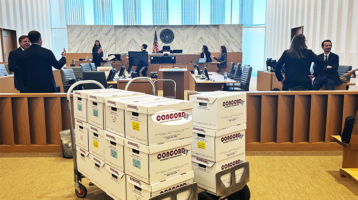
Digital trial tools are valuable, but courtrooms still rely heavily on printed materials. Judges, witnesses, jurors, clerks, and opposing counsel may need paper copies on short notice. Many courts also maintain specific preferences for tabs, binders, labeling, courtesy copies, and delivery procedures.
Determine early how many sets will be required and what each set must contain. A court set may differ from a witness set. A clean exhibit binder may differ from counsel’s annotated notebook. Large cases may require daily replenishment, replacement exhibits, color demonstratives, oversized boards, and overnight production support.
The pretrial production checklist should address at least five operational questions:
- Which materials must be filed, lodged, exchanged, or delivered before trial begins?
- How many sets are required for the court, witnesses, opposing counsel, and the trial team?
- Which items require color, tabs, binding, blowbacks, or oversized formatting?
- Who has authority to approve last-minute changes and release production?
- What is the backup plan if an exhibit is added, corrected, or needed outside regular business hours?
For matters proceeding in Los Angeles courts, time-sensitive delivery and production planning can be as consequential as document organization. Trial teams should confirm courthouse requirements and leave enough time for quality control before materials are dispatched.
Treat Security and Chain of Custody as Trial Issues
The trial notebook often contains more than public filings. It may include confidential exhibits, expert materials, medical records, trade-secret information, protected deposition testimony, or data drawn from forensic collections. Those materials require the same care at trial that they required during discovery.
Maintain a documented chain of custody for sensitive source media and final production materials. Know who received the records, who processed them, where they were stored, and how they were delivered. For physical binders and exhibits, use controlled packaging and delivery confirmation. For digital sets, use secure access controls and verify that only authorized recipients can retrieve the files.
This discipline also supports defensibility. If a question arises about whether a production set matched the intended exhibit or whether a redaction was applied correctly, documented handling and quality-control records provide a reliable answer.
Make the Notebook Useful at Counsel Table
The best trial notebook does not demand attention. It reduces friction. Counsel should be able to open a section and immediately see the current witness sequence, controlling rulings, examination materials, and exhibit references. Litigation support should be able to produce a corrected or supplemental set without guessing which version is controlling.
Run a tabletop rehearsal before the first day of trial. Ask the team to locate a key exhibit, a ruling on an anticipated objection, a witness’s prior statement, and the correct courtroom copy. Test the process as it will actually occur, including handoffs between attorneys, paralegals, vendors, and courtroom technology personnel. The gaps revealed in rehearsal are far less costly than the gaps exposed before the judge.
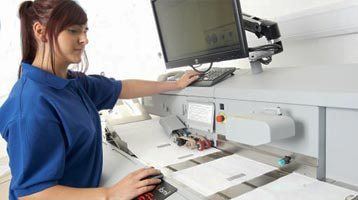
Concord Document Technologies supports trial teams with controlled exhibit production, legal copying, document scanning, digital printing, and time-sensitive delivery for complex matters. When the record is large and the schedule is unforgiving, experienced production support helps keep the trial notebook what it should be: a dependable working tool when every page matters.