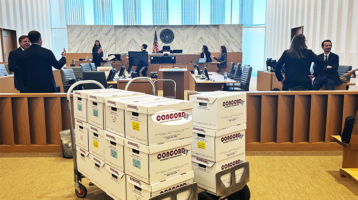
A trial team should not be deciding whether an email is Exhibit 147 or Exhibit 174 while a witness is waiting on the stand. The best ways to organize trial exhibits create one controlled system that moves from review to production to courtroom use without changing identifiers, losing versions, or leaving counsel searching through folders under pressure.
For high-stakes matters, exhibit organization is more than an administrative task. It is a chain-of-custody, accuracy, and presentation issue. The system must work for attorneys, paralegals, litigation support, witnesses, opposing counsel, the clerk, and the judge – often across paper binders and digital presentation files at the same time.
Call CONCORD for Trial Exhibit Binder printed overnight
213-745-3175
Start With a Single Exhibit Control List
The exhibit control list is the source of truth. Build it before finalizing binders, printing labels, or exporting trial presentation files. Each record should identify the proposed exhibit number, document title or short description, Bates range, date, source or custodian where useful, format, authentication status, objections, admitted status, and the location of the native or production file.
Do not maintain separate numbering lists for the trial team, the binder vendor, and the courtroom technician. That is how duplicate numbers and inconsistent descriptions enter the record. One master list should drive every output, with clear ownership for updates and a documented approval process for renumbering.
A spreadsheet may be sufficient for a contained matter. For larger cases, connect the control list to the document review platform or litigation database so exhibit selections, tags, and Bates information can be validated against the underlying record. The right method depends on volume and case complexity, but the principle does not change: there must be one authoritative exhibit inventory.
Reserve Number Ranges Before Production
Establish a numbering convention early. Some teams use sequential numeric exhibits. Others use party prefixes, such as P-001 or D-001, or separate ranges for demonstratives and impeachment materials. Follow the court’s orders and local practices first, then apply a convention that remains readable during testimony.
Leave room for late additions. A rigid sequence with no reserved ranges can force a disruptive renumbering when a newly designated record becomes necessary. Reserved blocks, such as 1-199 for initial exhibits and 200-249 for anticipated supplements, give the team flexibility. They should be controlled, not treated as permission to add materials without approval.
Organize Trial Exhibits by How They Will Be Used
A document’s place in a review database is not always its place at trial. Trial exhibits should be organized for retrieval during witness examination and argument. That usually means maintaining several coordinated views of the same exhibit set.
The master exhibit list is organized by number. A witness index groups the exhibits likely to be used with each witness. A subject or issue index connects exhibits to claims, defenses, timelines, and key events. Counsel may also need a deposition cross-reference showing the transcript pages where a document was marked, discussed, or authenticated.
These views prevent a common failure: a team can locate an exhibit by number but cannot quickly identify which records support a specific line of questioning. Build the issue and witness indexes from the same master data rather than creating free-form, disconnected trial notes.
Separate Admitted, Offered, and Reference Materials
Physical and digital exhibit collections should make status visible at a glance. An exhibit marked for identification is not the same as an admitted exhibit. A document that is only a demonstrative or attorney work product should not be mixed into the admitted-evidence set.
Use clear status fields and consistent labels for proposed, marked, offered, admitted, excluded, withdrawn, and demonstrative materials. Update those statuses in real time during trial. If the court admits only selected pages or portions of a composite exhibit, record that limitation immediately and make sure the digital version presented to the jury matches the ruling.
Build Paper Binders for Courtroom Retrieval
Paper remains essential in many courtrooms, even when the trial is digitally presented. Judges, witnesses, and opposing counsel may need printed copies. Some courts require courtesy sets, and a paper binder is often the fastest backup when a display system, network connection, or file path fails.
Use durable, clearly labeled binders with a cover sheet, spine label, exhibit index, and tab dividers. Tabs should match the exact exhibit numbers in the control list. For lengthy exhibits, add internal tabs or a table of contents that directs users to the relevant section, but do not alter the exhibit itself in a way that creates confusion about what has been admitted.
Print quality matters. Confirm that color-coded emails, photographs, spreadsheets, tracked changes, and scanned handwriting remain legible after printing. Verify page orientation, foldouts, attachment order, and page numbering. A binder that is technically complete but difficult to read does not serve the courtroom.
For high-volume productions, create a production checklist that accounts for the court set, witness set, opposing counsel set, attorney working sets, and secure backup copies. Every set should be version-controlled. If a replacement page is issued, document who received it and when.
Maintain a Courtroom-Ready Digital Set
The digital exhibit set should mirror the master control list and the final paper binders. Use a predictable naming structure, such as `P-001_Contract_Executed.pdf`, rather than relying on vague file names or Bates ranges alone. Include leading zeros so files sort correctly.
Store each final exhibit as a stable, searchable PDF unless the court requires or permits a native file. Preserve the original native file separately when it is relevant to authenticity or demonstrative use. For video, audio, and other media, test playback on the actual courtroom equipment or an equivalent setup. Confirm sound, codecs, resolution, and timestamps well before the first witness is called.
Keep the trial-ready folder separate from working drafts. It should contain only approved, final files. Limit edit permissions, maintain an access log when appropriate, and use secure storage that is available to authorized team members. Sensitive matters require the same discipline for trial exhibits as for collected ESI, including controlled access and defensible handling.
Conduct a Pretrial Reconciliation
The most valuable quality-control step is a full reconciliation before trial. Compare the master control list against every printed binder, the digital exhibit folder, deposition designations, motion-in-limine rulings, and the court’s exhibit requirements. This is where teams catch a missing attachment, an outdated PDF, an incorrect Bates range, or a tab that does not match the index.
Assign the reconciliation to people who did not assemble the original set when possible. Fresh review is more likely to identify assumptions and production errors. Then run a short courtroom simulation: ask a team member to locate a random exhibit by number, witness, issue, and description. If retrieval takes too long, the system needs refinement.
Call CONCORD for Trial Exhibit Binder printed overnight
213-745-3175
Plan for Changes Without Losing Control
Trial preparation rarely ends when the binders are printed. Stipulations, evidentiary rulings, and witness developments can change the final set quickly. The answer is not to stop making changes. It is to make each change traceable.
Use a dated change log that records the exhibit number, action taken, reason, approving attorney, affected sets, and whether the digital and paper versions were updated. Avoid informal instructions such as “use the new contract” without a corresponding record. In a fast-moving trial, vague updates create conflicting copies that can reach the courtroom.
When overnight production or courthouse delivery is needed, provide the service team with the approved control list, final files, quantities, tab specifications, delivery contact, and deadline. Clear instructions reduce the risk of a last-minute production error. Concord Document Technologies supports trial exhibit production with controlled printing, Bates labeling, binder assembly, and time-sensitive delivery for matters that cannot afford uncertainty.
A well-organized exhibit system gives trial counsel something more valuable than neat binders: confidence that the record can be found, verified, and presented when the courtroom is waiting.