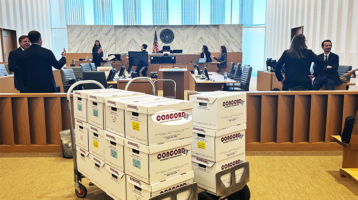
How to prepare courtroom exhibit books is not a task to leave until the week before trial. A missing page, mismatched tab, unreadable copy, or inaccurate Bates reference can interrupt an examination and undermine counsel’s control of the record. Exhibit books must be treated as a managed production process, with clear source control, disciplined quality assurance, and enough time to correct problems before the books reach the courtroom.
For complex matters, the objective is not simply to create binders. It is to deliver a complete, court-compliant exhibit set that attorneys, witnesses, the judge, jurors, and courtroom staff can use without hesitation.
CALL CONCORD TODAY (213) 745-3175 or email cs@concorddt.com
Start With the Court’s Requirements and the Trial Team’s Plan
Before pulling a single document, confirm the governing requirements. Federal and state courts, individual departments, and judges may have different expectations for premarked exhibits, electronic presentation, hard-copy courtesy sets, format, deadlines, and handling of oversized or sealed materials. A standing order may require numbered tabs, a specific index format, separate binders for each party, or delivery to the courtroom before a particular date.
The litigation team should also decide which documents are truly expected to be offered at trial. An exhibit list often begins broad and narrows substantially through motions in limine, stipulations, deposition designations, and final witness preparation. Producing every potentially marked document may be appropriate in some cases, but it can create unwieldy books and increase the chance that an outdated or excluded item remains in circulation.
Establish one authoritative exhibit list. It should identify the exhibit number, short description, document date, Bates range or source identifier, status, sponsoring witness if known, and any special handling instruction. Keep this list under version control. A spreadsheet circulating through email without an identified owner is a common source of numbering conflicts.
Build a Clean, Finalized Document Set
Courtroom exhibit books are only as reliable as their underlying documents. Pull files from the approved litigation repository or review platform, rather than from individual desktops or prior production folders. Verify that each document matches the exhibit list and that the selected version includes all pages, attachments, native-file printouts, and relevant color content.
This review requires judgment. A black-and-white print may be adequate for a contract, but it may obscure annotations, tracked edits, photographs, maps, highlighted emails, or spreadsheet color coding. Likewise, a native spreadsheet converted to PDF can become unreadable if columns are compressed or worksheets are omitted. When a document’s format affects meaning, produce a courtroom-ready version that preserves what the witness and fact finder need to see.
For sensitive matters, document control should include chain-of-custody discipline. Restrict access to source files, record who approved the final exhibit set, and use secure transfer methods. Sealed, confidential, personally identifiable, or protected health information may require redacted versions, separate binders, or special filing and delivery procedures. Do not assume a discovery production is automatically suitable for public courtroom use.
Confirm Bates Numbers and Exhibit Numbers Separately
Bates numbers identify documents within a production. Exhibit numbers identify trial items. They serve different purposes and should never be treated as interchangeable.
Confirm that the Bates range printed in the exhibit index matches the pages in the actual document. If an exhibit contains multiple documents, identify each component clearly. If a document was reprocessed, redacted, or supplemented after discovery, confirm that the displayed Bates numbering remains accurate. Counsel should be able to hear a witness reference a page and locate it immediately in every corresponding set.
Exhibit labels also need a consistent convention. Whether the court uses plaintiff’s numbers, defense letters, joint exhibit numbers, or another format, apply the same label on the index, tab, cover sheet, electronic version, and presentation database. Small inconsistencies create avoidable confusion during trial.
Organize the Books for Fast Courtroom Use
A courtroom exhibit book should support quick retrieval under pressure. The most dependable structure is usually a clear cover, a detailed index, durable numbered or lettered tabs, and exhibits arranged in the exact sequence shown on the final list. Multi-volume books should include volume labels and page ranges on the spine and cover.
Binders remain useful when the court, witnesses, or counsel need to turn pages quickly. They are also practical when documents may be added or substituted close to trial. Perfect-bound or coil-bound books can look polished and remain stable, but they are less forgiving if the exhibit order changes. The right choice depends on the court’s preferences, volume of material, and probability of late revisions.
For high-volume trials, divide sets into logical volumes. A single overfilled binder is difficult to transport, hard to navigate, and more likely to break. Use consistent volume breaks and repeat the exhibit index, or include a master index in Volume 1 with clear references to later volumes. If an exhibit is unusually large, such as a site plan or timeline, prepare it as a separately labeled demonstrative or oversized exhibit rather than forcing it into a standard binder.
The index should do more than list exhibit numbers. Include a concise description and a Bates range or page reference. A useful index allows counsel to confirm the correct document before opening the tab. It also helps courtroom staff identify a missing or misplaced item without reviewing every page.
Use a Formal Quality-Control Review
The final production review is where experienced trial support teams earn their value. Quality control should be conducted against the approved exhibit list, not merely against the files sent to print. A second reviewer should inspect a complete assembled set before the full run is released.
Review for the following operational issues:
- Every exhibit on the approved list is present, and no withdrawn or superseded exhibit remains.
- Tab labels, index entries, cover sheets, and electronic copies use the same exhibit number and description.
- Page order is correct, Bates numbers are visible, and no pages are duplicated, cut off, blank, rotated, or missing.
- Color documents, photographs, charts, and spreadsheets remain legible in their printed format.
- Binder capacity, tab placement, hole punching, and binding are durable enough for repeated courtroom handling.
Do not rely solely on thumbnail review. Print defects can be visible only on the physical page. Inspect representative pages from each document type, then inspect every exhibit’s beginning and end. In a short set, review every page. In a massive set, a documented sampling protocol may be necessary, but the exhibit list, tabs, and critical pages should still receive complete verification.
Prepare the Right Number of Sets and a Backup Plan
The required quantity depends on the court, parties, witnesses, and counsel table needs. At minimum, teams often need a court set, an opposing-counsel set, a witness set, and working sets for examining attorneys. Juror sets may be required in some proceedings but are not routine in every case. Confirm the requirement rather than assuming it.
A prudent production plan includes controlled backup copies. Maintain a final PDF set that mirrors the hard-copy books, with searchable text where possible. Keep a secure electronic copy accessible to the trial team, along with replacement tabs, individual exhibit reprints, and extra binders. If a witness book is misplaced or a court requests an additional copy, the team should be able to reproduce the exact version quickly.
Electronic backups do not eliminate the need for print planning. Courtroom internet access may be limited, presentation systems can fail, and judges may prefer a physical copy for annotations or bench use. The strongest approach aligns paper books, searchable PDFs, and any trial presentation database to the same final exhibit list.
Control Delivery and Last-Minute Changes
The final risk is logistics. Confirm where the books must go, who is authorized to receive them, when courthouse access is available, and whether security screening or loading restrictions apply. For matters in Los Angeles, delivery timing to locations such as Stanley Mosk Courthouse or First Street Federal should account for traffic, security procedures, and the practical time required to get materials into the correct department.
Use labeled, sealed cartons and keep a delivery manifest. The manifest should identify the number of volumes, recipient, delivery location, and time of transfer. For confidential or sealed materials, require documented receipt and maintain custody records. A box left with a general reception desk is not a delivery plan.
Late changes happen. The answer is not to rebuild every book without controls. Assign a single decision-maker for revisions, issue a revised exhibit list, identify whether the change affects all sets, and label replacement pages or volumes clearly. If the court permits supplemental books, make the supplement easy to distinguish from the original set. Silent substitutions create future disputes about what version was used at trial.
When Professional Trial Exhibit Production Is Worth It
Internal teams can prepare smaller, stable exhibit sets when deadlines are reasonable and the source files are clean. The trade-off changes when a matter includes thousands of pages, multiple parties, expedited deadlines, confidential material, color-intensive evidence, or delivery requirements across several locations.
In those situations, a legal document production partner can provide secure file intake, printing, Bates verification support, tabbing, binding, electronic counterparts, and documented delivery. Concord Document Technologies supports trial teams with 24/7 production capacity and courtroom-ready exhibit binders for time-sensitive matters.
The best exhibit books disappear into the work of the trial. Counsel finds the document, the witness sees the correct page, and the court receives an accurate record. That result comes from preparation that treats every tab, page, and delivery handoff as part of the case.